

GST Invoice Kevi Rite Banavvu? સ્ટેપ બાય સ્ટેપ ગાઈડ 2026
GST invoice kevi rite banavvu: સાચા GSTIN, HSN code, tax calculation અને બધી 16 ફરજિયાત fields સાથે. મફત invoice generator પણ સામેલ.

On this page
Key takeaways
- સાચા GST invoice માં Rule 46 ની બધી 16 fields હોવી જોઈએ; એક પણ field રહી જાય તો buyer નું ITC અટકી જાય છે અને ₹10,000 ની penalty નું જોખમ રહે છે.
- બંને GSTIN ના પહેલા બે અંક સરખાવો, રાજ્ય એક જ હોય તો CGST અને SGST, જુદું રાજ્ય હોય તો IGST.
- Invoice number કોઈ gap વગર sequence માં ચાલવા જોઈએ, backdating ગેરકાયદેસર છે, અને માલનું invoice dispatch પહેલાં નીકળવું જોઈએ.
- દરેક item પર HSN કે SAC code જરૂરી છે (₹5 કરોડ સુધી 4 અંક, એથી ઉપર 6 અંક); code રહી જાય તો દરેક invoice પર ₹50 લાગે છે.
આ ગાઈડ કેમ જરૂરી છે
GST invoice સાચી રીતે બનાવવું એ આખી GST compliance નો પાયો છે. ખોટા invoice થી તમારા customer ની input tax credit અટકી જાય છે, GSTR-1 filing માં mismatch આવે છે, અને ₹10,000 અથવા tax ની રકમ, બેમાંથી જે વધારે હોય, એટલી penalty લાગી શકે છે. છતાં આજે પણ ઘણા નાના વેપારીઓ અધૂરી fields, ખોટા HSN code કે ખોટા tax split વાળા invoice બનાવે છે.
આ ગાઈડમાં તમે 5 મિનિટમાં એક પરફેક્ટ GST invoice બનાવતાં શીખશો, પછી ભલે અમારા મફત invoice generator થી (signup ની જરૂર નથી) કે myBillPlease billing software થી (free plan માં unlimited invoices). અંતે તમને દરેક mandatory field, થતી સામાન્ય ભૂલો અને આ આખા કામને automate કરવાની રીત ખબર હશે.
શરૂ કરતાં પહેલાં શું શું જોઈએ
પહેલું invoice બનાવતાં પહેલાં આ વિગતો ભેગી કરી લો
- તમારો business GSTIN, એટલે કે 15 અંકનો GST registration number (હજી registration ન હોય તો gst.gov.in પરથી લઈ લો)
- તમારા business નું નામ, સરનામું અને state code (GSTIN ના પહેલા 2 અંક)
- Customer નું નામ અને સરનામું, B2B માં તેનો GSTIN પણ
- દરેક product કે service માટે HSN code અથવા SAC code, અમારું HSN code finder mybillplease.com/hsn પર છે
- દરેક item પર લાગતો GST rate, GST 2.0 માં 5%, 18% કે 40% (mybillplease.com/tools/gst-calculator વાપરો)
- તમારા bank account ની વિગતો, payment લેવા માટે
- પાછલો invoice number, કારણ કે નવું invoice sequence માં પછીનું હોવું જોઈએ
સ્ટેપ બાય સ્ટેપ: તમારું GST invoice બનાવો
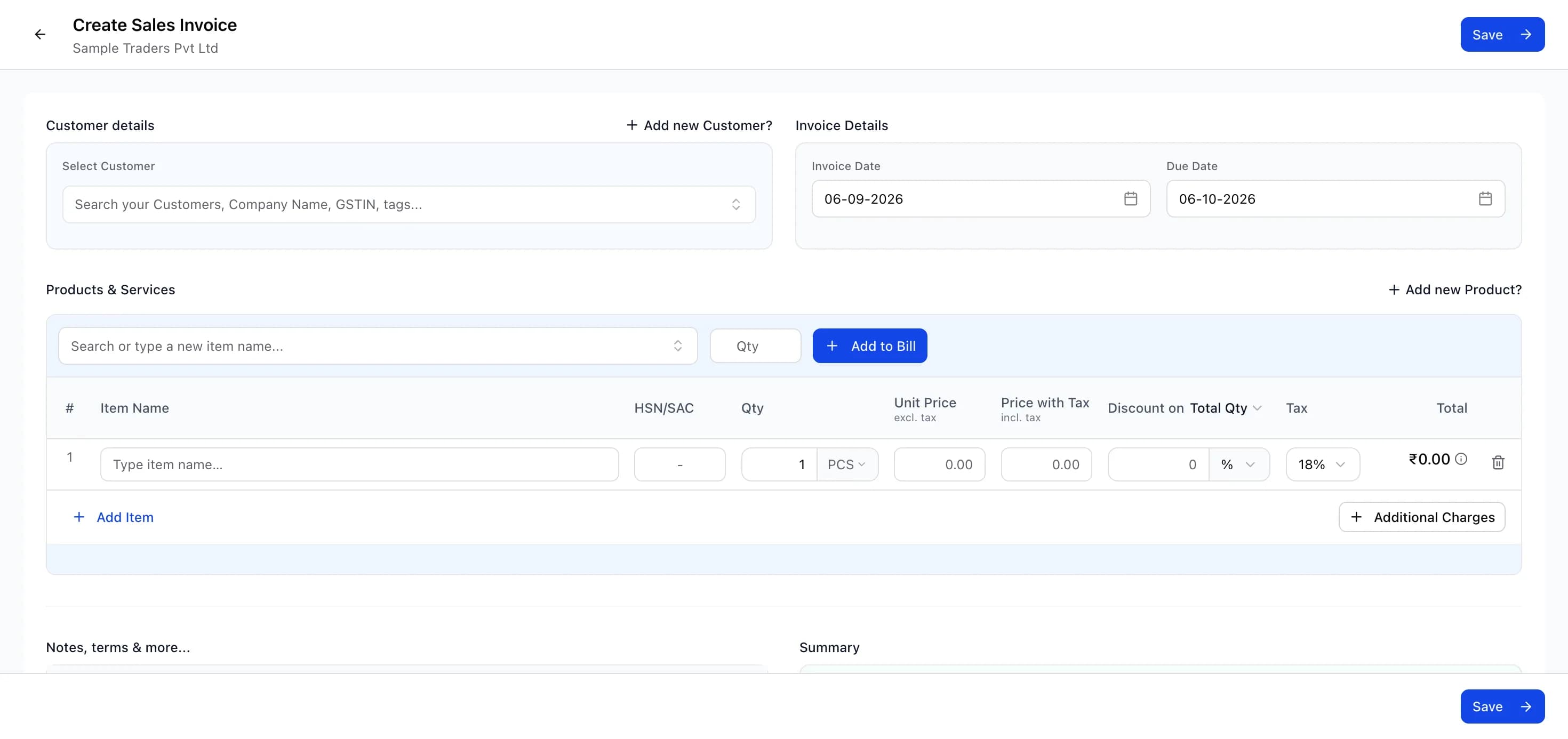
એક-બે વારના કામ માટે મફત invoice generator થી શરૂ કરો (signup ની જરૂર નથી), અને રોજિંદી billing માટે myBillPlease પર sign up કરો (free), જ્યાં customer અને product સેવ રહે છે. જીએસટી બિલ કેવી રીતે બનાવવું, એ સવાલનો જવાબ આ steps માં છે:
GST invoice બનાવવાના steps
- તમારા business ની વિગતો ભરો: નામ, સરનામું, રાજ્ય, GSTIN, ફોન અને ઈમેલ (એટલે કે Bill From વાળો ભાગ).
- Customer નું નામ અને સરનામું ભરો; B2B માં customer GSTIN ફરજિયાત છે અને એના પરથી જ tax type નક્કી થાય છે.
- Invoice number sequence માં રાખો (INV-042 પછી INV-043, વચ્ચે કોઈ gap નહીં) અને invoice date નાખો.
- Line items ઉમેરો: description, HSN/SAC code, quantity, unit price, discount હોય તો તે, અને GST rate.
- Tax split તપાસો: એક જ રાજ્યના customer પર CGST+SGST, બીજા રાજ્ય પર IGST, હાલના GST 2.0 rates પ્રમાણે.
- Bank account number, IFSC code, bank નું નામ, payment terms અને terms and conditions ઉમેરો.
- Final કરતાં પહેલાં બધી 16 mandatory fields જોઈ લો, જેમાં place of supply અને signature પણ આવે છે.
- PDF download કરો અથવા ઈમેલ, WhatsApp કે web link થી મોકલો, અને એક નકલ ઓછામાં ઓછાં 6 વર્ષ સાચવી રાખો.
માલના કિસ્સામાં invoice ત્યારે બનવું જોઈએ જ્યારે માલ તમારા પરિસરમાંથી નીકળે, અથવા એ પહેલાં. Customer નો GSTIN system ને જણાવી દે છે કે તે કયા રાજ્યમાં છે, અને એના પરથી જ નક્કી થાય છે CGST+SGST કે IGST; B2C invoice માં inter-state વેચાણ માટે delivery વાળું રાજ્ય જોઈએ. HSN/SAC codes directory માં જોઈ લો અને દરેક rate ને હાલના GST 2.0 rates સાથે મેળવી લો: 5% (જરૂરી ચીજવસ્તુઓ), 18% (standard), 40% (luxury). દરેક field ની ઝીણવટ માટે અમારી સંપૂર્ણ format ગાઈડ જુઓ. myBillPlease માં business details, numbering અને bank details સેવ રહે છે અને આપોઆપ ભરાઈ જાય છે, સાથે તમે Razorpay payment link ઉમેરી શકો છો જેથી customer એક ક્લિકમાં online ચુકવણી કરી દે. એક વાર જારી થયા પછી invoice એ કાયદેસર GST દસ્તાવેજ છે: માસિક return ભરતી વખતે તે તમારા GSTR-1 માં દેખાશે, અને તમારો customer તેના પર ITC લઈ શકે છે (B2B માં).
સારા GST invoice માટે કામની સલાહ
Invoice બનાવતી વખતે થતી 5 સામાન્ય ભૂલો
ભૂલ 1: ખોટો GSTIN. તમારા કે customer ના GSTIN માં ટાઈપિંગની ભૂલથી ITC mismatch થઈ જાય છે. GSTIN હંમેશાં copy-paste કરો, હાથે ટાઈપ ન કરો. myBillPlease GSTIN નું format આપોઆપ ચકાસી લે છે.
ભૂલ 2: HSN code રહી જવો. દરેક item પર HSN code જરૂરી છે. છોડી દેવાથી દરેક invoice પર ₹50 ની penalty લાગે છે (વર્ષમાં વધુમાં વધુ ₹25,000). Service આપનારાઓને પણ SAC code જોઈએ.
ભૂલ 3: ખોટો tax type. જ્યાં CGST+SGST લાગવો જોઈએ ત્યાં IGST લગાડી દેવો કે એનાથી ઊલટું, બંનેમાં સુધારાની લાંબી પ્રક્રિયા વેઠવી પડે છે. Tax type GSTIN ના state code પરથી software ને નક્કી કરવા દો, અંદાજથી ક્યારેય ન લગાડો.
ભૂલ 4: invoice number નો sequence તૂટવો. Invoice numbers માં gap (INV-041, INV-043, તો 042 ક્યાં ગયું?) GST compliance માં સીધો red flag છે. Auto-numbering વાળું billing software વાપરો.
ભૂલ 5: backdated invoice. GST માં જૂની તારીખ નાખીને invoice બનાવવું ગેરકાયદેસર છે. માલ માટે invoice ની તારીખ માલ નીકળવાની તારીખ કે એ પહેલાંની હોવી જોઈએ. Service માટે કામ પૂરું થયાના 30 દિવસની અંદર. જો મોડું થઈ ગયું હોય તો આજની તારીખથી અત્યારે જ invoice જારી કરો.
તમારું પહેલું GST invoice અત્યારે જ બનાવો, બિલકુલ મફત
વિકલ્પ 1: એક વારનું ઝડપી invoice. અમારું મફત invoice generator 2 મિનિટમાં professional GST invoice બનાવી દે છે. કોઈ signup નહીં. વિગતો ભરો, PDF download કરો. પહેલા invoice કે એક વારની billing માટે એકદમ યોગ્ય.
વિકલ્પ 2: automation સાથે રોજિંદી billing. myBillPlease પર sign up કરો (હંમેશ માટે free plan). Customers, products અને bank details એક વાર સેવ કરો. દર વખતે 30 સેકન્ડમાં invoice તૈયાર. Auto-numbering, આપોઆપ tax calculation, આપોઆપ GSTR reports. 7 professional PDF templates માંથી પસંદ કરો. ઈમેલ કે WhatsApp થી મોકલો.
બંને વિકલ્પોમાં બધી 16 mandatory GST fields સામેલ હોય છે, tax state code પ્રમાણે સાચો ગણાય છે, અને તૈયાર PDF સીધું customer ને મોકલવા લાયક હોય છે.
Frequently asked questions
- GST invoice મફતમાં કેવી રીતે બનાવવું?
- mybillplease.com/tools/invoice-generator પર મફત invoice generator વાપરો, ન signup જોઈએ ન credit card. તમારા business અને customer ની વિગતો ભરો, HSN code અને GST rate સાથે items ઉમેરો, અને professional PDF download કરી લો. રોજિંદી billing માટે free plan માં unlimited invoices મળે છે. બંને રીતે બનતા invoice માં બધી 16 mandatory fields હોય છે.
- GST invoice માં કઈ કઈ fields ફરજિયાત છે?
- CGST Rules ના Rule 46 મુજબ 16 fields ફરજિયાત છે: supplier નું નામ, સરનામું અને GSTIN; sequence માં unique invoice number (વધુમાં વધુ 16 characters); invoice date; recipient નું નામ, સરનામું અને GSTIN (B2B માટે); HSN કે SAC code; description; quantity અને unit; taxable value; GST rate; CGST અને SGST માં વહેંચાયેલી કે IGST ની રકમ; place of supply; reverse charge નો ઉલ્લેખ; અને signature. એક પણ field રહી જાય તો invoice non-compliant થાય છે અને ખરીદનારનું ITC અટકે છે.
- Invoice પર GST કેવી રીતે calculate કરવો?
- દરેક item ની taxable value (unit price ગુણ્યાં quantity, discount બાદ) ને લાગુ પડતા GST rate થી ગુણો. એક જ રાજ્યમાં એ રકમ સરખા ભાગે CGST અને SGST માં વહેંચાય છે, બીજા રાજ્યમાં આખી રકમ IGST થાય છે. ₹10,000 ના item પર 18% GST એટલે intra-state માં CGST ₹900 વત્તા SGST ₹900, inter-state માં IGST ₹1,800; બંનેમાં કુલ invoice ₹11,800.
- CGST+SGST લાગશે કે IGST, એ કેવી રીતે ખબર પડે?
- તમારા GSTIN ના પહેલા 2 અંક (state code) customer ના state code સાથે સરખાવો. બંને સરખા હોય તો એ intra-state supply છે, CGST અને SGST સરખા ભાગે લગાડો; જુદા હોય તો inter-state supply છે, આખા rate પર IGST લગાડો. GSTIN વગરના B2C વેચાણમાં delivery ના સરનામાવાળું રાજ્ય જોઈને નક્કી કરો.
- મારા products નો HSN code કેવી રીતે શોધવો?
- mybillplease.com/hsn પરની મફત HSN code directory માં બધા 97 chapters અને 22,000 થી વધુ codes છે, જેને product ના નામ કે code number થી શોધી શકાય છે. કેટલાંક ઉદાહરણ: T-shirts માટે 6109, computers માટે 8471, cosmetics માટે 3304, furniture માટે 9403. Service આપનારા HSN ને બદલે SAC code વાપરે છે.
- શું ફોનથી GST invoice બનાવી શકાય?
- હા. myBillPlease ફોન, tablet કે laptop, દરેક device ના browser માં ચાલે છે, કોઈ app install કરવાની જરૂર નથી. ફોનના browser માં mybillplease.com ખોલો, log in કરો, અને desktop જેવી જ સુવિધાઓ સાથે invoice બનાવો. બનેલું professional PDF ફોનથી સીધું WhatsApp કે ઈમેલ પર મોકલી શકાય છે.
- Free plan પર કેટલા invoice બનાવી શકાય?
- Free plan માં invoice ની કોઈ મર્યાદા નથી, unlimited customers માટે unlimited invoices, ન trial period ન credit card. તેમાં આઠેય document types, HSN code સાથે inventory management અને પાયાના GST reports આવે છે. Shopify integration, advanced GSTR reports, Razorpay payment links અને multi-user access ₹799 પ્રતિ મહિને વાળા Starter plan માં મળે છે.