

Credit Note Kya Hota Hai? Debit Note से अंतर, फॉर्मेट और GST नियम 2026
Credit note kya hota hai, debit note से इसका अंतर, Section 34 के नियम, format, time limit और GSTR-1 रिपोर्टिंग, पूरी गाइड उदाहरणों के साथ।

On this page
Key takeaways
- Credit note original invoice की value और आपका output tax दोनों घटाता है; debit note दोनों को बढ़ाता है। Original invoice को कभी edit मत कीजिए।
- Credit note उस financial year के बाद आने वाली 30 नवंबर तक, या annual return की तारीख तक, जो भी पहले हो, जारी करना ज़रूरी है।
- Credit note को GSTR-1 की Table 9A में और debit note को Table 9B में दिखाइए, साथ में original invoice number और customer का GSTIN भी दीजिए।
- दोनों के लिए अलग sequential series, HSN code, और अगर आप ₹5 करोड़ की e-invoicing threshold से ऊपर हैं तो IRN भी चाहिए।
Credit Note Kya Hota Hai और Debit Note क्या होता है?
GST billing में हर transaction प्लान के मुताबिक नहीं चलता। कभी customer माल वापस कर देता है। कभी invoice में ज़्यादा पैसा चार्ज हो जाता है। कभी invoice जारी होने के बाद discount तय होता है। कभी गलत tax rate लग जाता है। हमारे users के साथ यह रोज़ होता है। इन सब हालात में आप original invoice को बस edit नहीं कर सकते, GST में यह गैरकानूनी है। इसकी जगह आप credit note या debit note जारी करते हैं।
Credit note तब जारी होता है जब आपको original invoice की value घटानी हो। इससे customer को credit मिलता है, यानी उसे आपको कम पैसा देना है, या आपको उसे refund देना है। Debit note तब जारी होता है जब value बढ़ानी हो, यानी customer को original invoice से ज़्यादा पैसा देना है।
दोनों documents CGST Act की Section 34 के तहत आते हैं। इन्हें आपकी GSTR-1 (Table 9) में दिखाना ज़रूरी है और ये GSTR-3B में आपकी output tax liability पर असर डालते हैं। इनमें गड़बड़ी हुई तो आपके customer को ITC mismatch और आपको GST notice मिल सकता है।
इस गाइड में समझाया गया है कि कौन सा document कब जारी करना है, format में क्या-क्या ज़रूरी है, ये आपकी GSTR-1 filing पर कैसे असर डालते हैं, और myBillPlease में इन्हें कैसे बनाया जाता है। Structure देखने के लिए आप मुफ़्त credit note format template भी डाउनलोड कर सकते हैं।
Credit Note aur Debit Note Me Antar
कौन सा document कब इस्तेमाल करना है, यह समझने के लिए एक झटपट तुलना
| Credit Note | Debit Note | |
|---|---|---|
| मकसद | Invoice की value घटाना | Invoice की value बढ़ाना |
| Supplier पर असर | Output tax liability घटती है | Output tax liability बढ़ती है |
| Customer पर असर | ITC घटता है (reverse करना पड़ता है) | ITC बढ़ता है (ज़्यादा claim कर सकते हैं) |
| आम वजहें | Return, ज़्यादा चार्ज, discount, rate की गलती | कम चार्ज, अतिरिक्त services, rate ऊपर की तरफ ठीक करना |
| GST section | Section 34(1) CGST Act | Section 34(3) CGST Act |
| GSTR-1 table | Table 9A, Credit Notes | Table 9B, Debit Notes |
| Time limit | अगले FY की 30 नवंबर तक या annual return की तारीख तक | कोई तय time limit नहीं बताई गई |
| कौन जारी करता है | Supplier (विक्रेता) | Supplier (विक्रेता) या खरीदार |
| GSTR-3B पर असर | Table 3.1 में output tax घटता है | Table 3.1 में output tax बढ़ता है |
Credit Note कब जारी करें
CGST Act की Section 34(1) इन हालात को बताती है
- Customer ने माल वापस किया, पहले invoice किए गए माल की पूरी या आंशिक वापसी
- माल कम निकला या खराब निकला, delivery के बाद quality की दिक्कत
- Original invoice में ज़्यादा चार्ज हो गया, गलत rate, गलत quantity, या calculation की गलती
- Sale के बाद discount या rebate, यानी original invoice जारी होने के बाद तय हुआ discount
- गलत GST rate लगा दिया, जैसे 18% चार्ज कर दिया जबकि GST 2.0 के बाद item असल में 5% का है
- ज़्यादा tax वसूल लिया, यानी कोई भी ऐसी स्थिति जहाँ customer से लागू GST से ज़्यादा लिया गया
- Services तय शर्तों के मुताबिक नहीं दी गईं, यानी invoice की गई services का कुछ हिस्सा पूरा नहीं हुआ
- Shopify refund, यानी जब customer order return करता है और आप Shopify में refund process करते हैं, तो myBillPlease अपने आप credit note बना देता है
Debit Note Kya Hota Hai और कब जारी करें
Debit note, credit note के मुकाबले कम इस्तेमाल होता है, लेकिन उतना ही ज़रूरी है। आप debit note तब जारी करते हैं जब original invoice में value कम दिखाई गई हो। आम स्थितियाँ ये हैं:
कम चार्ज करना: आपने ₹10,000 का invoice बनाया, लेकिन तय कीमत ₹12,000 थी। बची हुई रकम के लिए ₹2,000 और उस पर लागू GST का debit note जारी कीजिए।
अतिरिक्त services: आपने तय scope से बाहर जाकर extra services दीं। Invoice को edit करने के बजाय अतिरिक्त रकम का debit note जारी कीजिए।
Rate ऊपर की तरफ ठीक करना: अगर आपने 5% GST चार्ज किया लेकिन सही rate 18% है, तो GST के अंतर का debit note जारी कीजिए। GST 2.0 के बाद यह बात खास तौर पर लागू होती है, क्योंकि कुछ items नीचे वाले slab से ऊपर वाले slab में चले गए हैं।
Price escalation clause: जिन contracts में price escalation का प्रावधान होता है, वहाँ escalation के बाद बढ़ी हुई रकम debit note से ही दर्ज की जाती है।
Debit note की timing भी मायने रखती है
Credit note के उलट, debit note जारी करने की कोई सख़्त time limit नहीं है। लेकिन आपका customer debit note पर अतिरिक्त ITC सिर्फ़ ITC claim की तय समय-सीमा के अंदर ही ले सकता है, यानी अगले financial year की 30 नवंबर तक।
ज़रूरी Format: Credit Note Format में क्या-क्या होना चाहिए
CGST Rules के Rule 53 के मुताबिक credit note और debit note में कुछ तय fields होना ज़रूरी है। कोई एक field छूट गई तो document non-compliant हो जाता है:
Credit note और debit note, दोनों के लिए:
1. Supplier का नाम, पता और GSTIN. 2. Document की प्रकृति, यानी साफ़-साफ़ Credit Note या Debit Note लिखा होना. 3. एक unique sequential serial number (invoice से अलग series में). 4. जारी करने की तारीख. 5. Recipient का नाम, पता और GSTIN (B2B के लिए). 6. जिस original invoice का हवाला दिया जा रहा है, उसका number और तारीख. 7. Supply की taxable value. 8. Tax का rate और रकम, यानी CGST, SGST या IGST. 9. Supplier या अधिकृत प्रतिनिधि के हस्ताक्षर.
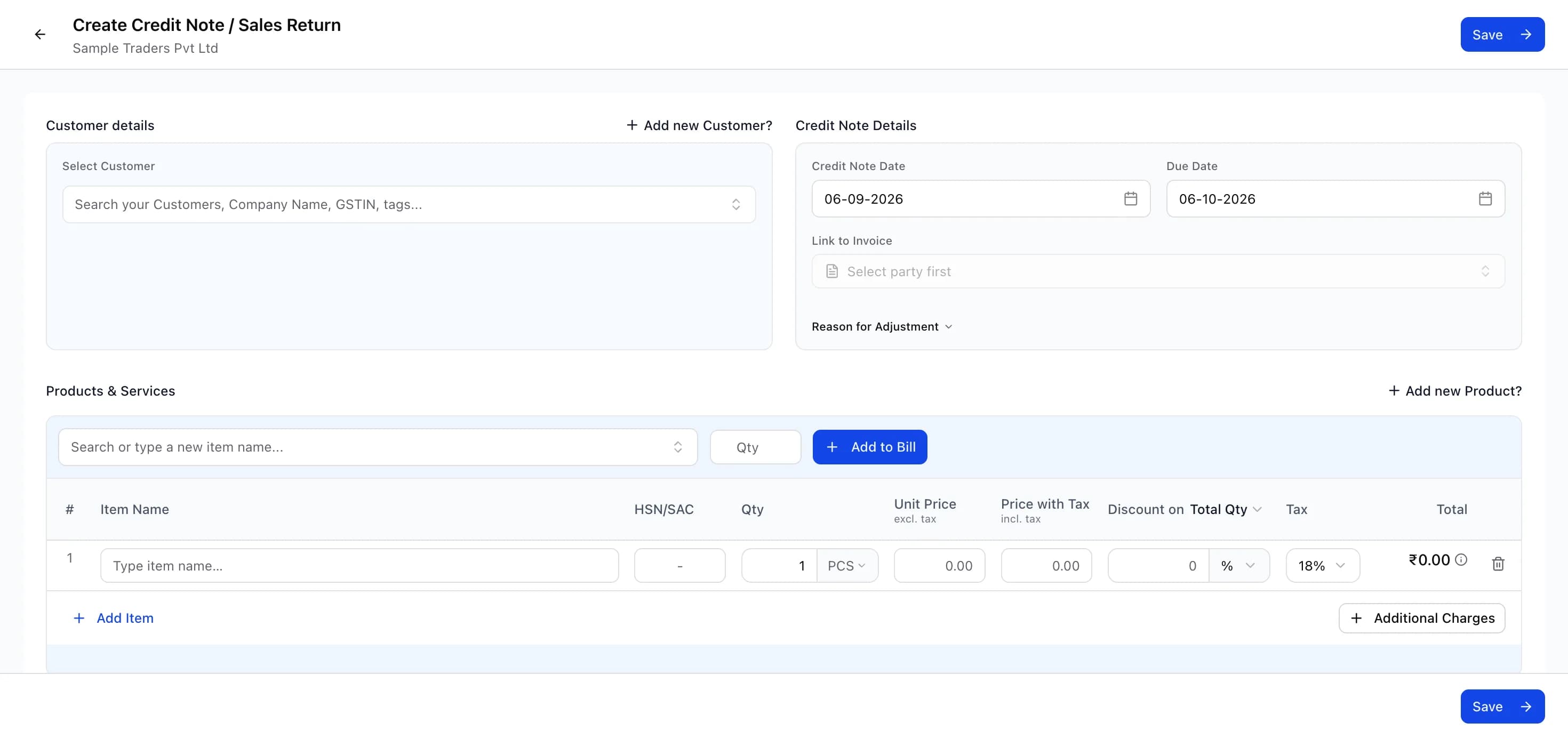
Credit note का number unique और sequential होना चाहिए, बिल्कुल invoice number की तरह। Invoice से अलग पहचान के लिए CN-001, CN-002 जैसी अलग series रखिए। myBillPlease में credit notes की अपनी auto-incrementing series होती है। जब आप credit note बनाते हैं, तो आप original invoice चुनते हैं, return items या adjustment amount बताते हैं, और system सही tax reversal अपने आप निकाल देता है।
सटीक layout देखने के लिए मुफ़्त credit note format template डाउनलोड कीजिए। Debit note के लिए यही structure इस्तेमाल कीजिए, बस उस पर Debit Note लिखिए और ध्यान रखिए कि अतिरिक्त रकम positive हो।
Credit Note aur Debit Note का आपके GST Returns पर असर
व्यावहारिक उदाहरण
उदाहरण 1, customer माल वापस करता है: आपने 100 units ₹500 प्रति unit के हिसाब से बेचीं, साथ में 18% GST। कुल invoice: ₹59,000 (₹50,000 + ₹9,000 GST)। Customer 20 units वापस कर देता है। ₹11,800 का credit note जारी कीजिए (₹10,000 + ₹1,800 GST)। आपकी GSTR-3B में output tax ₹1,800 घट जाएगा। Customer अपने ITC में से ₹1,800 reverse करेगा।
उदाहरण 2, sale के बाद discount: आपने ₹1,00,000 + 18% GST का invoice बनाने के बाद customer को 10% discount दिया। ₹11,800 का credit note जारी कीजिए (₹10,000 + ₹1,800 GST)। यह original invoice में बदलाव करने से ज़्यादा साफ़ तरीका है और audit trail भी सही बना रहता है।
उदाहरण 3, GST 2.0 के बाद गलत GST rate: आपने 22 सितंबर 2025 से पहले किसी item पर 12% GST का invoice बनाया। GST 2.0 के बाद वह item 5% में आ गया। 22 सितंबर से आगे की जिन sales पर गलती से 12% का invoice बना, उन पर 7% GST के अंतर का credit note जारी कीजिए। इससे लिया गया tax ठीक हो जाता है और आपका GST 2.0 compliance साफ़ रहता है।
myBillPlease में credit note बनाने में 30 सेकंड लगते हैं। Original invoice चुनिए, वापस आए या adjust हुए items चुनिए, और system सही tax reversal खुद निकाल देगा। Credit note अपने आप आपकी GSTR-1 Table 9 में चला जाता है। न manual हिसाब, न format की गलतियाँ।
Credit Note और Debit Note बनाइए, बिल्कुल मुफ़्त
myBillPlease सभी 8 GST document types को सपोर्ट करता है, जिनमें credit note और debit note भी शामिल हैं। Original invoice चुनिए, adjustment बताइए, बाकी सब system संभाल लेगा: सही tax calculation, सही format, auto-incrementing series number, और GSTR-1 reporting।
Shopify sellers के लिए: जब customer order return करता है और आप Shopify में refund process करते हैं, तो myBillPlease अपने आप उससे जुड़ा credit note बना देता है। कुछ भी हाथ से करने की ज़रूरत नहीं। Credit note original invoice से जुड़ जाता है और tax reversal आपकी GSTR-1 और GSTR-3B reports में पहुँच जाता है।
मुफ़्त शुरू कीजिए, invoice, credit note, debit note और बाकी सभी GST documents बनाइए। न credit card, न trial period।
Frequently asked questions
- GST में credit note aur debit note me antar kya hai?
- Credit note original invoice की value घटाता है (माल वापसी, बाद का discount, ज़्यादा tax); इससे आपका output tax घटता है और customer को उतना ITC reverse करना पड़ता है। Debit note value और output tax बढ़ाता है, और customer अतिरिक्त ITC ले सकता है। दोनों Section 34 के तहत आते हैं और GSTR-1 Table 9 में दिखाए जाते हैं।
- क्या GST में credit note जारी करने की कोई time limit है?
- हाँ। Section 34(2) के तहत credit note उस financial year के बाद आने वाली 30 नवंबर तक जारी करना ज़रूरी है जिसमें original invoice बना था, या उस साल का annual return भरने की तारीख तक, जो भी पहले हो। यह deadline चूकने पर आप उस supply पर अपनी output tax liability घटा नहीं पाएंगे।
- Credit note GSTR-1 me kaise dikhaye?
- Credit notes GSTR-1 की Table 9A में जाते हैं। B2B के लिए original invoice number, तारीख, customer का GSTIN और reverse हो रही tax राशि देनी होती है; B2C के लिए tax rate के हिसाब से consolidated adjustments दिखाइए। हर credit note का serial number invoice series से अलग और unique होना चाहिए।
- क्या GST में खरीदार credit note जारी कर सकता है?
- नहीं, GST में credit note सिर्फ़ supplier जारी करता है। खरीदार कीमत बढ़ाने या अतिरिक्त भुगतान माँगने के लिए supplier को debit note भेज सकता है, लेकिन GSTR-1 में credit notes हमेशा supplier ही रिपोर्ट करता है। अपनी देनदारी घटाने के लिए खरीदार को supplier से credit note जारी कराना पड़ता है।
- क्या credit note में HSN code देना ज़रूरी है?
- हाँ, जिन items का adjustment हो रहा है उनके HSN code credit note और debit note में देना ज़रूरी है। ₹5 करोड़ तक के turnover पर 4 अंक, उससे ऊपर 6 अंक, export के लिए 8 अंक। HSN छोड़ने या गलत देने पर Section 125 के तहत ₹50 प्रति document, साल में ज़्यादा से ज़्यादा ₹25,000 की penalty लगती है।
- Credit note का input tax credit पर क्या असर होता है?
- B2B credit note जारी होने पर खरीदार को original invoice पर लिया गया ITC, credit note की रकम के अनुपात में, reverse करना पड़ता है। जैसे invoice में ₹18,000 GST था और credit note ₹3,000 reverse करता है, तो अगली GSTR-3B में ITC ₹3,000 घटेगा। यह reversal खरीदार की GSTR-2B में अपने आप आ जाता है।
- क्या मैं myBillPlease में credit note बना सकता हूँ?
- हाँ। Documents में New पर click कीजिए, Credit Note चुनिए और उससे जुड़ा original invoice चुनिए। वापस आए items या adjustment amount डालिए, system tax reversal खुद निकाल देता है। Note को अलग series में sequential number मिलता है, इसमें Rule 53 की सभी fields रहती हैं, और यह GSTR-1 Table 9A में चला जाता है।